

Most of my blog posts are lessons learned. I’m trying to achieve something, and I document the process I used to do it. This one is one of the few where, in the end, I didn’t achieve what I wanted. In this post, I aim to explain what I learned from trying to migrate from Jekyll to Hugo, and why, in the end, I didn’t take the final step.
Context
I started this blog on WordPress. After several years, I decided to migrate to Jekyll. I have been happy with Jekyll so far. It’s based on Ruby, and though I’m no Ruby developer, I was able to create a few plugins.
I’m hosting the codebase on GitLab, with GitLab CI, and I have configured Renovate to create a PR when a Gem is outdated.
This way, I pay technical debt every time, and I don’t accrue it over the years.
Last week, I got a PR to update the parent Ruby Docker image from 3.4 to 4.0.
I checked if Jekyll was ready for Ruby 4.
It isn’t, though there’s an open issue.
However, it’s not only Jekyll:
the Gemfile uses gems whose versions aren’t compatible with Ruby 4.
Worse, I checked the general health of the Jekyll project. The last commits were some weeks ago from the Continuous Integration bot. I thought perhaps it was time to look for an alternative.
Hugo
Just like Jekyll, Hugo is a static site generator.
Hugo is one of the most popular open-source static site generators. With its amazing speed and flexibility, Hugo makes building websites fun again.
Contrary to Jekyll, Hugo builds upon Go. It touts itself as "amazingly fast". Icing on the cake, the codebase sees much more activity than Jekyll. Though I’m not a Go fan, I decided Hugo was a good migration target.
Jekyll to Hugo
Migrating from Jekyll to Hugo follows the Pareto Law.
Migrating content
Hugo provides the following main folders:
contentfor content that needs to processedstaticfor resources that are copied as islayoutsfor templatesdatafor datasources
Check the full list for exhaustivity.
Jekyll distinguishes between posts and pages. The former have a date, the latter don’t. Thus, posts are the foundation of a blog. Pages are stable and structure the site. Hugo doesn’t make this distinction.
Jekyll folders structure maps as:
Jekyll |
Hugo |
|
|
|
|
|
|
|
|
|
|
When mapping isn’t enough
Jekyll offers plugins. Plugins come in several categories:
- Generators - Create additional content on your site
- Converters - Change a markup language into another format
- Commands - Extend the jekyll executable with subcommands
- Tags - Create custom Liquid tags
- Filters - Create custom Liquid filters
- Hooks - Fine-grained control to extend the build process
On Jekyll, I use generators, tags, filters, and hooks. Some I use through existing gems, such as the Twitter plugin, others are custom-developed for my own needs.
Jekyll tags translate to shortcodes in Hugo:
A shortcode is a template invoked within markup, accepting any number of arguments. They can be used with any content format to insert elements such as videos, images, and social media embeds into your content.
There are three types of shortcodes: embedded, custom, and inline.
Hugo offers quite a collection of shortcodes out-of-the-box, but you can roll out your own.
Unfortunately, generators don’t have any equivalent in Hugo. I have developed generators to create newsletters and talk pages. The generator plugin automatically generates a page per year according to my data. In Hugo, I had to manually create one page per year.
Migrating the GitLab build
The Jekyll build consists of three steps:
- Detects if any of
Gemfile.lock,Dockerfile, or.gitlab-ci.ymlhas changed, and builds the Docker image if it’s the case - Uses the Docker image to actually build the site
- Deploy the site to GitLab Pages
The main change obviously happens in the Dockerfile.
Here’s the new Hugo version for reference:
FROM docker.io/hugomods/hugo:exts

ENV JAVA_HOME=/usr/lib/jvm/java-21-openjdk
ENV PATH=$JAVA_HOME/bin:$PATH

WORKDIR /builds/nfrankel/nfrankel.gitlab.io

RUN apk add --no-cache openjdk21-jre graphviz \                                      (1)
&& gem install --no-document asciidoctor-diagram asciidoctor-diagram-plantuml rouge (2)| 1 | Packages for PlantUML |
| 2 | Gems for Asciidoctor diagrams and syntax highlighting |
At this point, I should have smelled something fishy, but it worked, so I continued.
The deal breaker
I migrated with the help of Claude Code and Copilot CLI. It took me a few sessions, spread over a week, mostly during the evenings and on the weekend. During migration, I regularly requested one-to-one comparisons to avoid regressions. My idea was to build the Jekyll and Hugo sites side-by-side, deploy them both on GitLab Pages, and compare both deployed versions for final gaps. I updated the build to do that, and I triggered a build: the Jekyll build took a bit more than two minutes, while the Hugo build took more than ten! I couldn’t believe it, so I triggered the build again. Results were consistent.
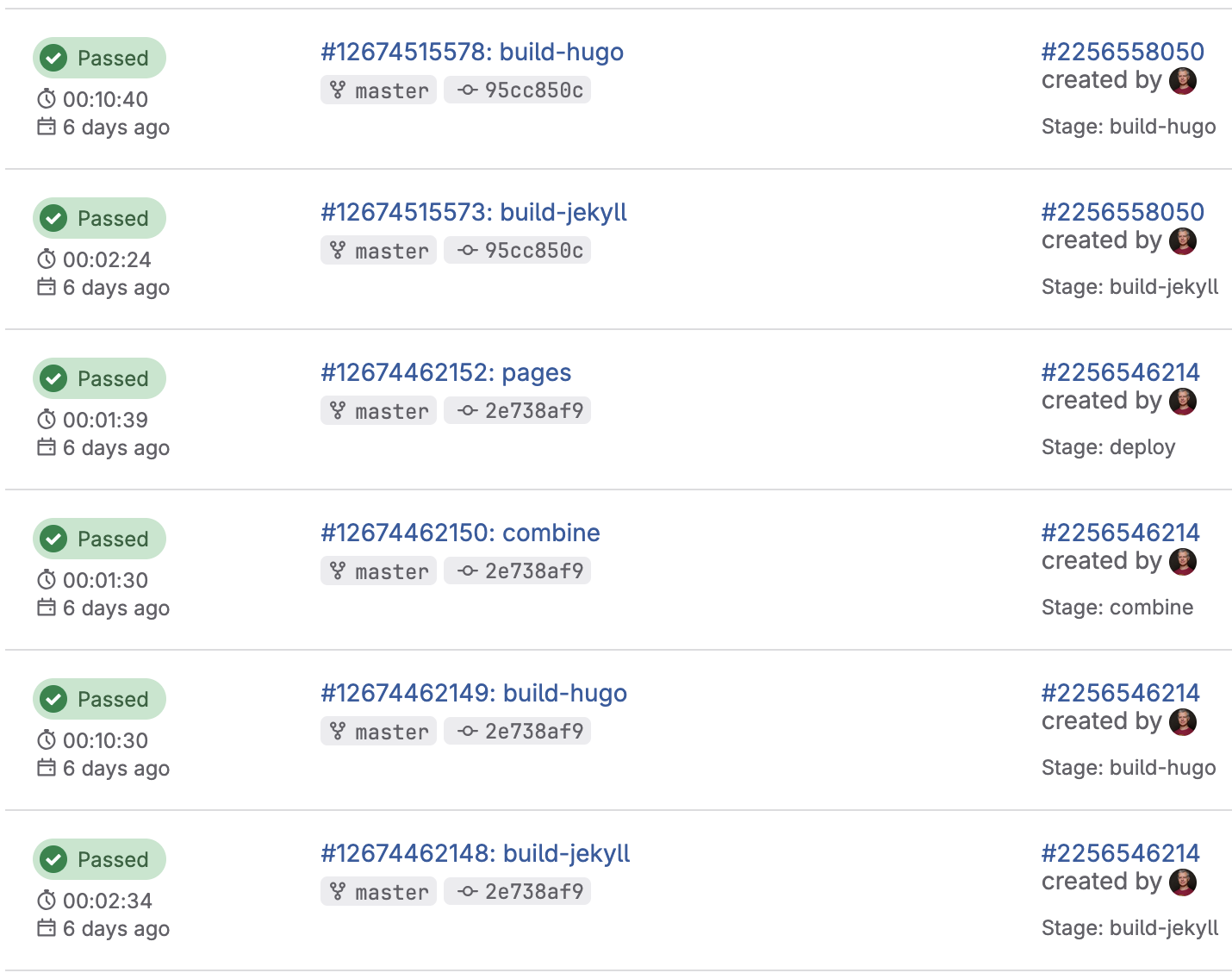
I analyzed the logs to better understand the issue. Besides a couple of warnings, I saw nothing explaining where the slowness came from.
                  │  EN
──────────────────┼──────
 Pages            │ 2838
 Paginator pages  │  253
 Non-page files   │    5
 Static files     │ 2817
 Processed images │    0
 Aliases          │  105
 Cleaned          │    0
Total in 562962 ms
When I asked Claude Code, it pointed out my usage of Asciidoc in my posts.
While Hugo perfectly supports Asciidoc (and other formats), it delegates formats other than Markdown to an external engine.
For Asciidoc, it’s asciidoctor.
It turns out that this approach works well for a couple of Asciidoc documents, not so much for more than 800.
I searched and quickly found that I wasn’t the first one to hit this wall:
this thread spans five years.
Telling I was disappointed is an understatement. I left the work on a branch. I’ll probably delete it in the future, once I’ve cooled down.
Conclusion
Before working on the migration, I did my due diligence and asserted the technical feasibility of the work. I did that by reading the documentation and chatting with an LLM. Yet, I wasted time doing the work before rolling back. I’m moderately angry toward the Hugo documentation for not clearly mentioning the behavior and the performance hit in bold red letters. Still, it’s a good lesson to remember to check for such issues before spending that much time, even on personal projects.